# How I use AI
> Markdown copy of https://tomiodusanya.com/notes/how-i-use-ai/
2026-11-15. On some days, I feel like Doctor Octopus. Here’s how I use AI, without losing my mind.
I think of AI as a time multiplier. Every so often, I ask myself,
> “How can I fire myself and stop being the blocker?”
The answer changes with context, but I have a rough rule. I keep the work that helps me think or teaches me something I’m curious about. The rest, I’m happy to hand off.
## On Writing
As a personal principle, I’ve stopped asking AI to write my drafts. Writing helps me think clearly, and I was outsourcing that process to AI. I’m also an emotional writer, and I don’t want to lose that voice.
I still hand AI the grunt work:
- It helps me catch and fix typos, thanks Grammarly.
- [Handy](https://handy.computer/) helps me convert my speech to text.[^1]
- Sorts my scattered notes into a sequence when I’m mapping a story.
It’s also easier to edit my own words than to weed the chaos of repeated meanings out of AI text. I plan to keep using my colons, semis and em dashes. They’re part of the English punctuation I learned in elementary school. You should have, too :).
Will I produce content less quickly? Definitely, but I’d rather read three 50-page books from authors I respect than twenty thousand single page summaries.
*Edit: I just discovered [Marker.page](https://marker.page/) by Jon Steinback and Ryan Bowman on How I AI. I’ll give it a spin.*
## On Productivity
I still enjoy doing the important work, but I’m happy to fire myself from the rest. I’m currently trying to use AI as an executive assistant, so my time goes to work only I can do. It’s still early days, with room to improve. I call my productivity agent Gbémi, short for the Yoruba phrase *Gbé mi dé bẹ̀* (take me there). Right now it focuses on two things:
- Help manage an Inbox.
- Keep me accountable.
### Here’s how I do it.
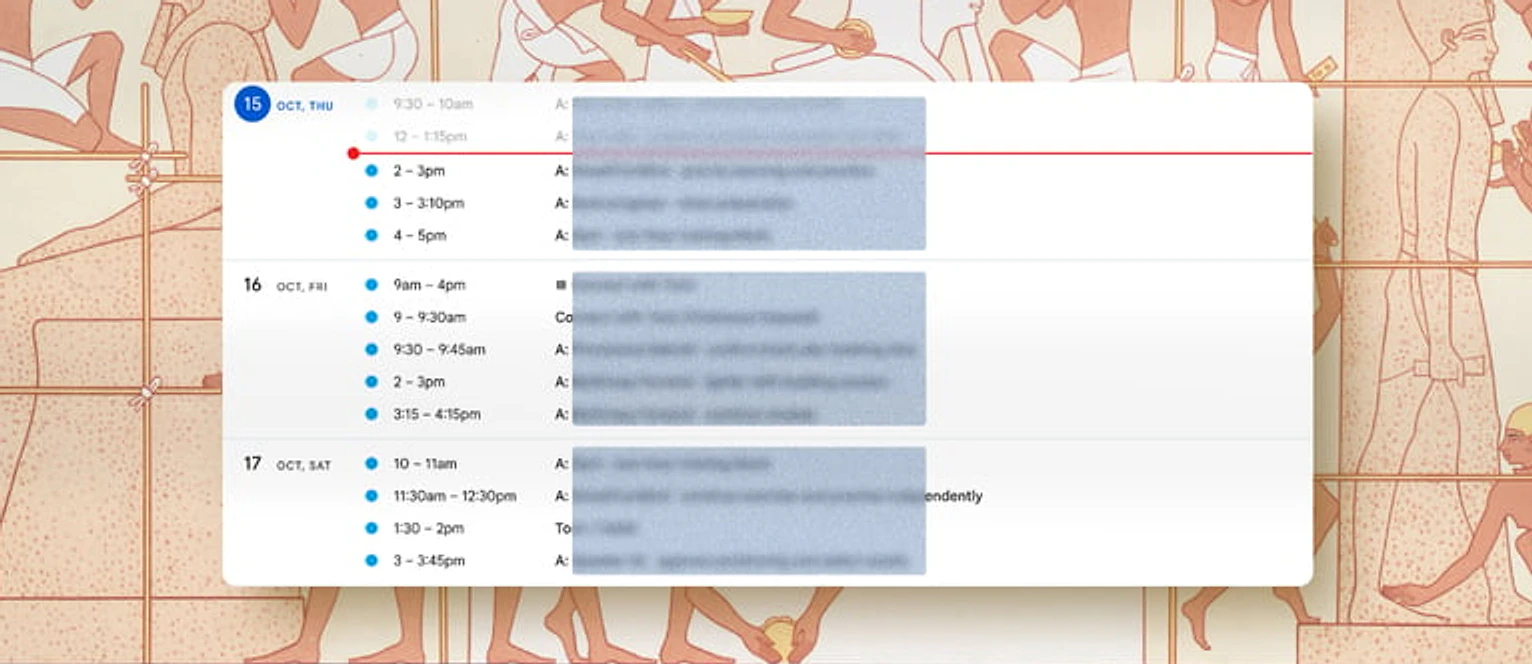
I’m privacy-conscious, so I won’t give an agent full access to my personal email. Instead, I have a dedicated agent email. My agent is able to triage tasks, draft replies and create calendar events with that email. I self-host [Keeper](https://keeper.sh/) to keep all my calendars in sync. This way, when *Gbémi* creates a calendar event, it shows up on my personal calendar. *Gbémi*’s calendar also knows when I’m unavailable because private events show up as blocked on Gbémi’s calendar.
I currently manage my personal to-dos in [Linear](https://linear.app/), and using its MCP, *Gbémi* can add tasks, pull in context, or help me prioritize the most important things.
Fig. 1.Screenshot of my Personal Calendar. Agent tasks start with A.
At the start of the week, Gbémi kicks off an automation that surfaces the most important items on my to-do list and proposes a goal for the week. I then confirm or tweak things. Within a few minutes, my calendar is blocked with tasks for the week.
At the end of each work day, Gbémi checks in to see if we got to everything we planned. When tasks slip, Gbémi updates my to-do lists in Linear or moves them to a later time.
This keeps me accountable, gives me a better sense of what I can actually achieve in a day, and gives me something to build on to improve my productivity. Smashing the to-do list also gives me an adrenaline kick, hence *Gbé mi dé bẹ̀*.[^2]
## On Fitness
I’ve worked out for some years, so I know my way around the gym. Here I use AI primarily for research. I would ask practical things, like “The Smith machine is busy, what science-backed alternatives can I do to target the same muscle group?”
I log my workouts in [PUSH](https://www.pushapp.co.uk/), and thanks to PUSH’s MCP, I can do that research in Codex and then make changes to PUSH right from my chat. It’s been really good.[^3]
When I visit a new gym, I make a video and share it with Codex. It identifies all the equipment in the video, and I’m able to plan a workout quickly using my existing data in PUSH.
One thing I’ve noticed is that the models play it safe with weights. So I play around with weights and let my body decide what feels right.
I also wish the models did a better job at giving form feedback during a workout, but I believe that’s just a matter of time.
## On Design and Engineering
This probably deserves its own post, but I’ll try to keep things brief.
My little Moleskine notebook is my daily driver, but Claude comes a close second. I use it for so many things.
### Design
I use it with [Paper](https://paper.design/) to fine-tune my designs.
I remember the days I used to pray for a way to seamlessly transfer my rendered page into Figma so I could fine-tune the final details. I ended up taking screenshots and hacking my way through those Figma prototypes. Thanks to Paper’s MCPs, those days feel like a hundred years ago right now 👴🏾.
I've also been doing a lot of 3D printing around the house of late. I’m able to get by without deep knowledge of Blender. For instance, I created this flower vase stool with a docking bay for my Roomba. I worked in Blender and Claude together, through Blender’s MCP, to get this over the line.
Fig. 2.A flower vase stool I designed, with room for my Roomba to park and charge
### Engineering
Aside from building work software, I use Claude as a learning assistant. I’ve also used it to build personal software for myself and my family:
- Built a [WhatsApp bot](/notes/adding-ai-to-my-parents-farm/) to help my parents run their farm efficiently.
- Built an energy monitor in Home Assistant using my Raspberry Pi.
- **A personal podcast:** I have a list of favourite publications, and an AI creates a weekly episode of news and trends for me. It’s mostly low-stakes content so I listen passively.
A few tricks I've learned recently:
- **Read** `Skill.md`**:** I've spent more time reading skill files from creators and people I admire. It's interesting how they write so succinctly to get the best output from agents.
- Alongside using Oxlint for deterministic lint rules, my `Agents.md` explicitly caps each code file at 4,000 tokens per file. I learned this from [Matt Pocock](https://www.youtube.com/@mattpocockuk). This helps the agent keep the code files reasonably sized.
It’s 7:30PM on Sunday night as I finish this, and Gbémi just pinged me for next week’s goal. I’ll leave you with the question I started with, “How can I fire myself?”, while I pick up my Moleskine and think it through.
If you’re open to sharing, I’d love to hear how you use AI today. What’s one task you’d never hand to AI? [ea@m.tomiodusanya.com](mailto:ea@m.tomiodusanya.com).
[^1]: Handy is a free, open-source speech-to-text app that runs offline on your computer.
[^2]: In Nigerian slang, *Gbé mi dé bẹ̀* is a rush of satisfaction, like a good meal or a cold drink under the hot sun.
[^3]: PUSH is a paid app. My early adopter trial is about to expire, so I’ll see if it’s worth keeping.